Some Different Free Productivity Tools

Sometimes a productivity system just isn’t right for your lifestyle and it can be a massive headache to discover this too late: such as after you’ve already taken your wallet out to give it a spin.

To help with this problem, DIGTD wants to showcase a few different but still useful productivity tools that won’t require any payment to try out.

Firefox

The first area worth looking into is Firefox-based add-ons; small plug-ins that can provide a little extra functionality for your browser. Mozilla’s Firefox 3 has swept the browser market so thoroughly that many computer users are already familiar with the program and this has resulted in the availability of a massive number of community created add-ons.

They can be a bit difficult to wade through however and it is for this reason that we want to detail a few of the better productivity focused extensions worth an installation.

OpenItOnline is a great time-saver that allows users to bypass the traditional launch of word processing programs such as Microsoft Office and instead open documents straight from their browser. Rather than requiring the installation of an Office Suit package, OpenItOnline gives Firefox users the ability to directly access .doc, .xls and many other common extensions right from their browser. It also hosts compatibility with Google Spreadsheets, Docs and more.

Screengrab! is another invaluable Firefox add-on that can be used for a variety of different, time-saving functions.

Users can save or copy image files of whole pages, rectangular sections or visible portions of any browser displays for later reference without having to print out the entire page.
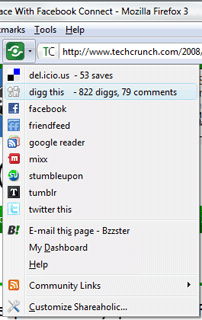
Firefox ShareaholicShareaholic is a fantastic tool for the demographic that uses the Internet for regular linking and news sharing, allowing for a substantial cutting down of the usual amount of time that frequent access can require.

The add-on supports popular services such as MySpace, Facebook, Twitter, Delicious and Digg and hosts the option to quickly check traffic rates and comments without actually having to visit the given network’s site.

As well as Firefox, Shareaholic also supports Microsoft Internet Explorer 7 and above as well as the Flock Browser.

This really is a great tool to help you build you collection of social bookmarks for various sites that you visit. There may also be some Search Engine Benefit in making sure most of your pages are bookmarked on various social bookmarking websites.

HP Smart Web Printing is one of the rare free extensions that is actually made available from a leading technology company. The Web Printing add-on allows for an excellent shortcut and editing program to be accessed directly from Firefox. Users can save pages as .pdf files, arrange and delete information exactly as they wish and combine multiple pages into one document before printing.

Evernote Web Clipper is an add-on from the popular productivity developers, Evernote, and functions as a free extension to help users conveniently import information to their Evernote account. A handy toolbar menu allows for in-depth context sorting and quick data management without actually requiring the user to launch Evernote.
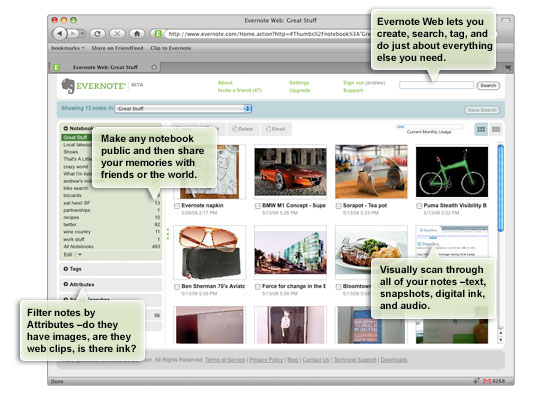
Evernote Web Clipper

Evernote is another of the big companies that offers a free GTD-centred service. Although it does cost more to fully register with a “premium account” most of the key features of Evernote are available with a no-charge account.

There are a few Getting Things Done programs that can be downloaded completely free of charge as well and it’s a good idea to have some of these bookmarked to try out for yourself. The sign-up and/or installation of these applications is usually extremely simple and quick, something that makes a trial run of any of them well worth the required time.

Nozbe is one of the leading developers in the GTD community and it has definitely earned its place by virtue of some fantastic work on the software client. For strict adherents of the GTD system Nozbe is well worth a shot due to its careful consideration of Allen’s directives and suggestions.

Free Nozbe accounts can access all of the sorting and information entry features responsible for making Nozbe so reputable among its users and purchase of the full version unlocks absolutely everything for the serious user.
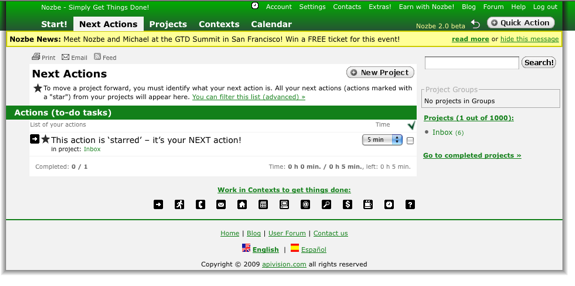
Nozbe GTD

ThinkingRock hosts great functionality, community and ease of use without requiring any payment. The developers at ThinkingRock are great at keeping up with their user’s needs and latest editions of the productivity client are always improving on an already formidable GTD system.
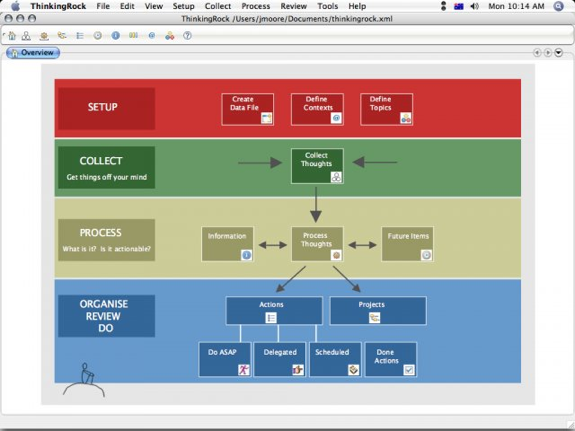
Thinking Rock GTD

The shareware and freeware communities are always worth a shot as well. One of the best results of the GTD explosion the Internet has seen in the last few years involves the massive amounts of programs constantly developed by enthusiastic developers, eager to try their hand at the perfect adaptation of Allen’s system. Try a few out for yourself and see how they work for your purposes.

Email sorting has long been a popular area for Getting Things Done adherents to work on and better manage, incorporating GTD organization as a front-line method for dealing with new, incoming information.

Here are a few cost free solutions to email clutter and inbox sorting.

To start off it’s a good idea to take a look at Google’s Gmail and the organization possible through making use of a few of its built-in features.

Gmail is a great email service for message organization, context sorting and more. Setting the site to HTML or Google Docs viewing can allow for the opening of .doc files for starters, allowing for much deeper levels of customization and specification.

Gmail users can also install Greasemonkey (designed by a Google Reader engineer) for free and then widely enhance the functionality of the email client by sorting contexts and actions as soon as emails enter the inbox.

Email Templates is another quality extension that uses Microsoft Outlook as its basis. Email Templates allows users to create custom frameworks for email sending, a feature that can make it into an invaluable tool for anyone that needs to send mass emails or standardized messages to multiple recipients.

Each of the frames created in Email Templates can be applied to as few or as many contacts as desired, making it into a great way to add personality or regular form to any message without spending a lot of time doing so.

There are also a number of other email add-on services that offer free trials to demonstrate the true value of their software. Additional worth for users committed to default email clients can be important and this is where most of these titles come into play. Here are a few licensed programs that deserve a trial run before purchase.
Thinking Rock GTD

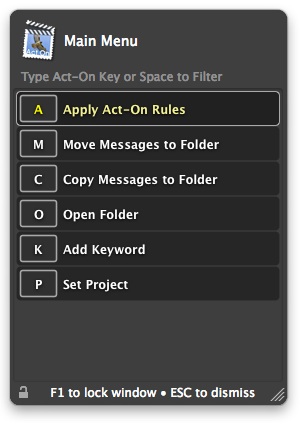
Mail Act-On is a great program to increase the usefulness of Apple Mail and boost the productivity of the email client’s regular users. The plug-in allows Mac fans the ability to assign hot keys or reference pop-up menus in order to quickly navigate the most valuable Mail features with ease.

The Rules panel in Mail Act-On expands for great sorting, providing a handy method for the context filing of all sent and received messages. Combined with hot key shortcuts, Mail Act-On is a fantastic way to immediately sort and clearly organize all of your messages before they get a chance to clutter up your message folders.

Claritude Software are another provider of email productivity tools based on Microsoft Outlook so Windows only.

Claritude Software offer a 30-day trial that gives users the opportunity to try out the powerful sorting engine available with the program.

The main benefits of Claritude are found in the organizational potential that is brought forth by being able to quickly file both outgoing and incoming emails, saving large amounts of time while allowing for easy GTD sorting. Find-as-you-type file searching is another well developed aspect that makes navigating an inbox much faster, cleaner and simpler.

Trying out the above programs is a great way to find your favorite systems without having to spend a dime to do so.

Take a few of them for a spin yourself and then explore the categories on your own as well in order to get the most productivity potential possible out of your everyday software.

Have I missed any free apps that I have not covered before? If so, please leave me a comment so that I can readdress this post.

Thanks,

Productivity, Motivation, and Personal Development Links – 5th April 2009

I am again sat writing this on the train from Leeds to London. Still enjoying the Free WiFi on the train and looking forward to another two days on a course down in London.

Life is still very busy for me. We had our best ever month at my business last month so there is plenty of work to do which is keeping me busier than I normally like.

Lots of projects to work on and lots of chance to test my productivity and organizational skills. I have just taken the decision to employ our first administrative assistant and I am looking forward to working with her to remove some of my administrative burden.

Here are my collection of links for this week.

  • My first link for this week is a link to the GTD blog of Kelly Forrister and a post about the GTD for Personal Finance. With the economy being in the state it is, I am sure that this is a good read that will be shared by many due to the ideas presented.
  • My third link is a link to a great post from Mashable which is a guide to better web working from your Apple iPhone.
  • My fourth link is a link to the latest release notes for Jello Dashboard. This is a Microsoft Outlook GTD Dashboard that I am sure I would take a better look at if I was a Windows user. I would be interested to hear of any good or bad reviews of this product.
  • My fifth and last link is a link to a great blog that I have just found called Books that can change your life. As you would imagine, this is a blog about some great productivity and motivational books that can change your life!. I found this via the authors review of the Getting Things Done book from David Allen.

Wishing you all a great week! Hopefully I will get some more posts out of draft and onto the site this week!

Getting Things Done – What are your Bad Habits?

This is another great video out of the GTD Summit.

This video has snippets from some GTD Summit attendees about their bad habits with relation to GTD. David Allen himself is even interviewed in the video!

I wish I could have been at the GTD Summit, may have to make next year for sure.


What are your bad habits?
I must admit mine is that I can sometimes miss my weekly review, I bet this is a common one..

Productivity, Motivation, and Personal Development Links – 29th March 2009

I am sat writing this on the train from Leeds to London. Free Wifi on the train is powering my Internet so no need for the 3G card.

Here are my collection of links for this week.

  • My first link for this week is a link to an interview with David Allen from the Washington Post. The interview is about how to Get Things Done and Organize Your Life.
  • My second link is a link to the Shoeboxed Blog that announces integration with Evernote. Shoeboxed is a service that allows you to mail in your receipts as and when you need to and now with the Evernote integration they will scan them into your Evernote account. If only they had this in the UK I would be a customer for sure!
  • My third link is a link to a review of Making it All Work, the latest book from GTD creator David Allen. I am quite shocked to admit that I have not yet read this book, but it is the next on my reading list after I have finished with Twyla Tharp and the Creative Habit.
  • My fourth link is a link to a great article comparing Getting Things Done and Autofocus. Both are great productivity methodologies and it is good to see the writers viewpoint of the differences between these two systems.
  • My fifth and last link is a link to some information about the latest version of reQall. reQall is an iPhone application that I reviewed back in November 2008 when it first came to my attention. One of the main new features of reQall is the ability to do location based reminders. All in all reQall should be looked at if you have an iPhone and want to improve your productivity.

Well, the WiFi is still holding up so I will publish this whilst I still can. I am down in London for a couple of days on a training course, should be fun.

Wishing you all a great week!

MacHeist Bundle 3 – 12 Mac Apps for $39

MacHeist 3

The MacHeist Bundle 3 is now live and ready to buy!

This is an awesome collection of Mac Apps for $39 with 25% of this going to a charity of your choice!

There are 8 Apps in the initial bundle with a further four getting released as the bundles are sold making a total of 12 Apps for $39.

One of these further four apps is The Hit List, a new GTD App that is similar to Things. The Hit List is currently selling for $69.99 so this in itself makes the bundle a bargain.

Check out all the Apps and the offer over at MacHeist.

http://www.macheist.com/bundle/u/59175/

Evernote Podcast – Tips on how to use Evernote

Evernote
I am just listening to the first Evernote Podcast and though I would share it with you all.

The topics covered in this first podcast are:

  • Hi there
  • What’s Evernote?
  • We’re one year olds
  • Business model, shmizzness model
  • How do you use Evernote?
  • Feeling secure
  • Where’s the mobile love?
  • Gimme my Griffin Clarifi

The Podcast can be played straight from the Evernote Blog or you can subscribe to the Podcast via iTunes.

I have written quite a few posts about Evernote so be sure to check out my Evernote Tag.

GTD Summit Interview with Phil Libin of Evernote

As I previously mentioned, the GTD Summit that just happened in San Francisco has resulted in some great online videos.

This video is from Lifehacker.nl and is an interview at the GTD Summit with Phil Libin, the CEO of Evernote.

The video covers the intersection of Evernote and GTD, the use of Evernote around the world and some ideas on how to improve Evernote.

Hope you enjoy it!

Productivity, Motivation, and Personal Development Links – 22nd March 2009

Well, another week is over.

I am really busy at the minute and having to focus a lot on my daily work in order to get it all done. We are getting a lot of orders which is always good and we probably should employ staff more but the current economic climate is really preventing me from taking on additional headcount in case the work slows down.

I guess it is a nice problem to have but my productivity and organizational skills are being tested right to the limit at the moment as I juggle quite a few different roles.

Here are my collection of links for this week.

  • My first link for this week is a topical (as it is Mothers Days here in the UK) titled Time Saving Tips for Mothers. Just a collection of a few little tips that my wife pretty much already does in order to be more organized when it comes to children.
  • My second link is a link to a post about Getting Things Done with Gmail Tasks. I do not use Gmail myself apart from the odd time when I need web access to my mail (as I use Google Apps to host all my email) although I know a lot of people swear by Gmail. Just some handy hints on how to make Gmail work for you in a GTD style.
  • My third link is a link to Getting Things Done with Projects 2.0. This is a fresh look at Project Management and how Project Management 2.0 can help change the views of the people involved for the better.
  • My fourth link is a link to a nice little post about the Trick to Evernote. I love Evernote and I use it more and more every day. I love finding new ways out to use the app.
  • My fifth and last link is a link to the cool Cult of Done Manifesto. Read it and I would love to start a comment discussion with your thoughts!

Well, that is it for this week. going to have a well earned rest now and hopefully I will get some more time this week to do some more posts.

Thanks and wishing you all a great week!

Productivity, Motivation, and Personal Development Links – 15th March 2009

I have just returned from a great four day break in the English Lake District with my wife. We were lucky to get babysitter for our children and we escaped for three great nights in the Lakes.

On Friday we did an 8 mile walk of Loughrigg Fell. Taking in Loughrigg Tarn, Grasmere, and Rydal Water. On Saturday we walked three of the Langdale Pikes, Pavey Ark, Harrison Stickle and Pike Of Stickle.

Had a great relaxing weekend away from the usual stresses and strains. I manged to eventually start reading “The Creative Habit” by Twyla Tharp. I bought this book around Christmas and I am enjoying reading it. Full review to follow.

Quite a big GTD week this week with the GTD Summit taking place in San Francisco. No doubt there will be loads of news to follow.

Here are my collection of links for this week.

  • My first link for this week is a post about Email Zero! – We have all heard of Inbox Zero, well how about Email Zero!. This is a post that outlines what an MIT Professor has done to only read his email once every three months.
  • My second link is a link to a 7 Step Program of Stress Management. We all have stress and we all handle it in different ways. I do not tend to show stress but that can be the worse way to handle it as it is there building up inside of you. This is a neat little post with 7 steps on how to handle your stress.
  • My third link is a link originally from Twitter about the way one user uses OmniFocus. I love OmniFocus and I love reading about how other people use it in their lives.
  • My fourth link is a link to a new GTD application called Getting Things Gnome. Getting Things Gnome, or GTG is the first true GTD application for the Linux GUI, Gnome. This is a great step forward for any Linux GTD’ers and I will be trying this app out in the coming weeks on one of my Linux laptops.
  • My fifth and last link is another application. This is Pocket Informant, and the fact that it is coming soon to the Apple iPhone. I used to use Pocket Informant way before GTD when I had my old Windows Mobile iPaq. Great little app and I will love to see how it shapes up on the iPhone.

Wishing you all a productive week, as always!

Andrew..