Evernote Note Taking Application Review

Evernote

I have got quite a few reviews stacked up for release on this blog and I cannot believe that I have never published a review of Evernote before.

I did review the Evernote iPhone application a few months ago. I love Evernote and it really is one of those applications that I use on a daily basis.

Evernote is one of the most well-known organizational programs on the internet and is a great choice for users looking for a GTD application or just a better, general tool to help sort out their daily lives.

Its “remember everything” slogan encapsulates the main goal of the app; to provide an easy and convenient method of taking digital notes from the user’s daily life.

Visually, Evernote is outstanding. The simple yet detailed aesthetic cultivated by the developers makes the program very welcoming and a joy to check into.

Evernote’s main features are all clearly laid out and easy to access for new users or those who only ever really use the program at a basic, surface level.

Each form of the system from the no-download web access to portable phone usage looks and navigates extremely well so users shouldn’t be worried about how their operating system or choice in medium will be able to handle it.

The developers of Evernote have obviously spent a lot of time packing the program with important features. Interface support is, frankly, quite astonishing.

As mentioned before, Evernote can be used on the web, on a Windows or Mac Client and also on mobile devices including the Apple iPhone. The option of signing in and using the whole array of tools without a download is also great for users who wish to access the program from various computers.

Some of the more innovative aspects of the application include incredibly simple copy and pasting from the web (both words and pictures) into Evernote and text searching within images.

The “Endless Tape” view through Evernote Windows is also interesting in that it allows users to scroll through all of the ‘memories’ they’ve pasted into the program — a great feature for those who want to make sure absolutely everything gets sorted from within their various files.

Once notes have been taken it’s also quite easy to organize, store and peruse your various work which makes it an excellent choice for those who want to incorporate the program into a GTD philosophy of work.

There aren’t too many faults worth mentioning with Evernote when considering the large amount of attention and continued work that has obviously gone into the program. While it may have a fairly overwhelming number of features this is ultimately a pretty difficult aspect of the program to consider negative.

The community attached to the program should help to make the learning curve relatively gradual and exciting. In future versions it would be good to see a greater emphasis on sorting information into more detailed categories, tasks and next actions although users are still able to make this happen on their own accord with a bit of effort.

The support is pretty remarkable and it’s obvious that the popularity of the program has lead to a great, helpful community. From Evernote’s homepage users can peruse press releases, news, updates, tours and manuals along with a quick video tour which highlights the main program features for the uninitiated.

RSS feeds, Facebook fan pages, FriendFeed and Twitter options all help to further increase the level of involvement with the Evernote world that dedicated fans can choose to get into as well.

Users will no doubt be impressed by Evernote and its wealth of features no matter what kind of organizational tool they’re interested in.

Whether accessed through the website, offline mode or via a mobile phone the program is a great bet for the busy user interested in introducing a little more order to their day to day lives.


How David Allen Gets Things Done

This video has been doing the rounds over the past couple of days so I thought I would post it to my blog in case you have not already seen it.

This is David Allen, the Author of the Getting Things Done Methodology in his home office. Although the video is only short, it shows you how David organizes his own office.

If you have not seen it, check it out.

Productivity, Motivation, and Personal Development Links – 25th January 2009

This weekend my @Home context has been getting a battering. I have knocked quite a few items off this list which included changing taps and replacing the floor in my en suite bathroom. Hopefully going to settle down for a nice move with my wife tonight and some well earned rest!

Here are my collection of links for this week.

  • My first link for this week is a link to a comic representation of Stephen Covey’s Time Management Matrix. I like this post, great visual representation that helps you get the time managament matrix with a smile.
  • My second link is a link to Motivating your Volunteers, a post from Rebecca Leaman on the Wild Apricot Blog. This is aimed at motivating volunteers in non-profit organizations but the concepts of Maslow can be used in many circumstances. I had a great Risk Management teacher when I was younger who was a real advocate of Maslow and reading this post stirred great memories for me.
  • My third link is a link to a a great thread on Lifehacker about analogue (low tech) capture devices. The good content is in the comments showing you what people use as their low tech capture device. As expected, the Moleskine is mentioned quite a bit.
  • My fourth link is a link to a good post from a GTD advocate about how they implement GTD. Nice post from somebody who started with Merlin Mann’s Inbox Zero process and then moved to GTD.
  • My fifth and last link for this week is a link to a review of PlutoPro. This is a Mac only GTD App that lives in your Menu Bar on your Mac. Looks quite a nifty lightweight app that has been added to my review list for another day.

I have a got a few GTD Application Reviews lined up for this week as well as some ideas for some more posts about my GTD thoughts. I have been listening to David Allen in my car over the past week whilst travelling and it has really sparked some great post ideas.

Hope you all have a great week.

Andrew..

Twinkle iPhone Twitter Application

Twinkle
Twitter has caught on in a huge way for many internet addicts and blog fanatics alike but the biggest problem with the site can be the time it takes to access and peruse when you’re just looking to make a quick update.

The Twinkle app for the iPhone looks to address this by providing a far more productive method of using Twitter.

Twinkle provides a convenient way to posting tweets no matter where you are and does so with a great deal of ease. The iPhone app functions perfectly and allows for quick Twitter use without having to go through the hassle of logging on to your computer to get onto the website.

The most interesting capability that Twinkle brings to the table is the ability to tweet your location data along with your message. While it is a great method of using the iPhone’s technological capabilities to enhance your posts it should be noted that this GPS information is only visible for other Twinkle users and doesn’t show up through the Twitter website.

For hardcore Twitter fans Twinkle is a good call although it does lose points for not having the map feature translate onto the main site (and adding their official user, Twinkleking to your list!). Overall the app is still a great download for those who tweet often enough that portable access is a relevant selling feature.

Twinkle is a free download from the iTunes App Store. If you use Twitter, feel free to follow my updates.

Motivational Songs – Spotify Playlist

Motivational Songs
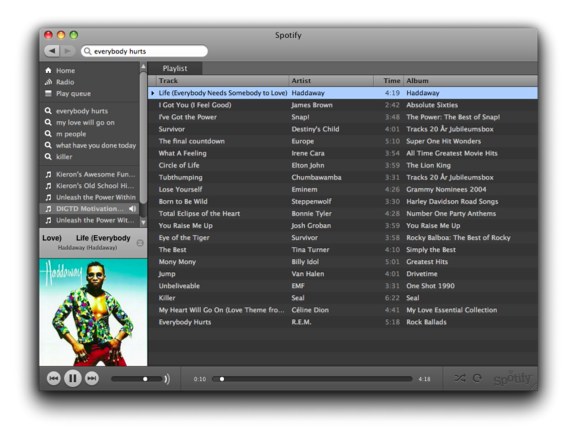
I have been using Spotify for the last couple of weeks and I am very impressed with the service it offers. I have created a playlist of 20 Motivational Songs for you to listen to for free

I received the free invite from Kieron Donoghue who has incidentally just published a great blog post titled Ten Reasons why Spotify Rocks. Read this blog post as a great intro to Spotify.

So, what is Spotify?

Spotify is a new way to enjoy music. Simply download and install, before you know it you’ll be singing along to the genre, artist or song of your choice. With Spotify you are never far away from the song you want.

There are no restrictions in terms of what you can listen to or when. Forget about the hassle of waiting for files to download and fill up your hard drive before you get round to organising them. Spotify is instant, fun and simple.

One of the cool things you can do with Spotify is to create and share playlists. So, in the spirit of my site I have put together a playlist of 20 Motivational Songs for you to listen to, free of charge courtest of Spotify.

To use this list you need Spotify installed on your Mac or PC. Then, simply follow this link to listen to my 20 Motivational Songs. Cool!

Good news, I have ten Spotify invites to give out to readers of this blog. To get one, sign up to my newsletter (so I have your email address) and leave a comment here. The next ten people will get a free invite to what is the hottest free music system on the Internet right now!

So, here are my songs in no particular order!

  • Life – Haddaway
  • I Feel Good – James Brown
  • I’ve Got the Power – Snap!
  • Survivor – Desiny’s Child
  • The Final Countdown – Europe
  • What a Feeling – Irene Cara
  • Circle of Life – Elton John
  • Tubthumping – Chumbawamba
  • Lose Yourself – Eminem
  • Born to Be Wild – Steppenwolf
  • Total Eclipse of the Heart – Bonnie Tyler
  • You Raise Me Up – Josh Groban
  • Eye of the Tiger – Survivor
  • The Best – Tina Turner
  • Mony Mony – Billy Idol
  • Jump – Van Halen
  • Unbelievable – EMF
  • Killer – SEAL
  • My Heart Will Go On – Celine Dion
  • Everybody Hurts – R.E.M.

I am not sure what regions Spotify currently works in but it does work in the UK for a change!

Motivational Songs

Another great post on Motivational Songs is from Jamie Harrop. View his 58 Top Motivational Songs for a more comprehensive list.

Got any more good Motivational Songs? Let me know and I can add them to the list.

Round Toit iPhone App Review

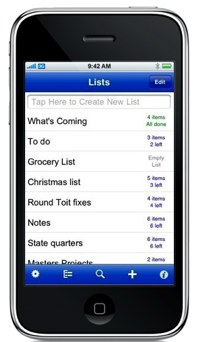
Round ToitiPhone owners can pick and choose from a staggering number of productivity applications, many of which are excellent in their own right, but the aim of your organizational goals is usually the most important criteria for choosing the right download.

Round Toit is pretty much just another of many to-do list applications but it succeeds in finding a good way to channel all of your tasks into a solid, temporary holding tank.

I first heard of the term a Round Toit from Zig Ziglar who is told to carry one in his pocket as his business card. Then when people say that haven’t got around to it, he would give them his card and say “You have now”.

Round Toit succeeds in its work toward providing a fully realized grouping and sorting system for all types of data. The application doesn’t aspire to be something that it isn’t and focuses well on the specific task of collecting and organizing all sorts of data the user has collected.

Items can be prioritized in different manners and allow for customized alerts, deadlines and more while unsorted work can be filtered into organized and/or unorganized categories for later handling. All lists can be moved around or edited quite easily and the overall view is clean and pleasant to look at.

The application costs $4.99 to download but may very well be worth the entry fee for iPhone owners in the market for a new productivity application. Probably the best way to assess Round Toit is within its stated framework as a to-do list and nothing else.

Users expecting a fully formed GTD app will be disappointed with the lack of options but those interested in a fantastic, virtual dumping point for new work and memos will likely be quite pleased with what Round Toit accomplishes.

Productivity, Motivation, and Personal Development Links – 18th January 2009

Another very productive week for me. I have been working on a very long customer report all week and also my latest eBook writing project for Cisco Press.

Deadlines really help you to focus and I am happy to say that I hit another one. Good planning and time allocation are key to working on a writing project with a deadline. I avoid procrastination and start early. There is nothing worse than leaving everything to the last minute, by which time you put yourself under undue pressure!

Here are my collection of links for this week.

I am just getting ready to set off to Havant near Portsmouth for three nights. This time my hotel advertises Free WiFi Internet so let’s see how good the connection is.

Hope you all have a great week.

Mind Mapping to Increase Productivity

The MindJet Blog have just had a great post about increasing productivity through Mind Mapping. This post included a link to a Mind Map that displays the way Mind Mapping can be used to increase productivity.

Mind Mapping Productivity

The link provided from MindJet only allows you to download the Mind Manager version so I have PDF’d the Mind Map and made it available here for all to see and enjoy.

Ubiquitous Capture Device, What is Yours?

Those of you who are followers of the Getting Things Done methodology will full understand the importance of the instant collection of your tasks. David Allen, author of the GTD system talks about the Ubiquitous Capture Device, meaning a device that is with you at all times enabling you to use it to capture your thoughts.

I have been doing some thinking recently about the capture devices I use as part of my collecting strategy. I have been practicing GTD for around two years now and I always say that the biggest change and benefit brought to me is the ability to capture items as they enter my head so that I can collect these in my inbox and process them at a later date.

moleskine

Another GTD term is Open Loops and I have written many posts that cover Open Loops. Just as a refresher, an Open Loop is a task that is not recorded. Each time you think, gosh I must do this, and gosh I must do that and do nothing about it, it creates a little Open Loop in your mind that takes up valuable processing power and causes stress. The empowerment of capturing your thoughts, as you have them is the biggest benefit that I have got out of GTD.

During the past few days I have been thinking about the various types of capture devices that I have used over the past two years and which have worked and which have failed.

There are two main categories of capture devices, the high tech and the low tech. By high tech I mean items such as iPhones, Blackberries, Laptops, and PDAs. Preferably running some task or GTD based software application. The low tech options include a good old pen and paper. The paper can form a notebook, stickies, journal, or daily planner. It really doesn’t matter as long as you can record your thoughts.

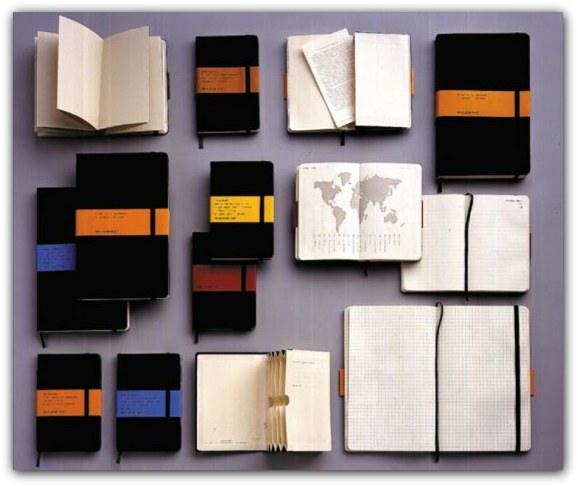
When I originally started implementing GTD I, like many others, rushed out and bought a collection of Moleskine’s. This is the techie in me who loves to go out and buy hardware, even when the hardware is a nice notebook. Moleskine’s are in my opinion the nicest notebooks that good money can buy. The quality of the finish and paper is second to none.

I bought the large notebook, small notebook and also some of the small Moleskine Cahier notebooks. I use my large and small notebook for day to day use and meetings. I teamed up the Cahiers with a throw away golf pencil and this made it into my back pocket as my Ubiquitous Capture Device.

This worked to a degree. As the Cahier notebook was an extra, it had to be remembered. It was not fully integrated into my life and there were times when I forgot it, leaving me without my trusty notebook to record tasks. I then ended up with around 6 dog eared Cahier notebooks “hanging around” and not really being productive.

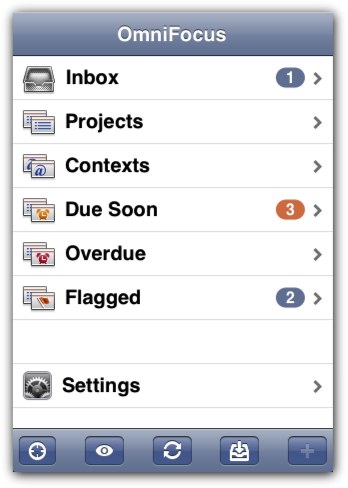
Then, the iPhone and OmniFocus for the iPhone came along. I started to use this as my capture device. My phone is always with me so it ticked the Ubiquitous requirement of the Ubiquitous Capture Device. The problem is that it takes a minimum of 10 seconds to get the phone turned on, OmniFocus load, and be in a position to add the task. Doesn’t sound like a lot but when you have an idea or task in your head that needs recording it sure does feel like a long time.

There are two items that are ubiquitous to me. My phone and my wallet. These pretty much go with me wherever I go. I feel the most important part of selecting a Ubiquitous Capture Device is to get one works and you WILL carry it wherever you go.

David Allen uses a low tech Ubiquitous Capture Device. He uses a wallet that has a built in notebook with tear off pages and an expandable Rotring pen. This works for David Allen and I am sure it would work for us all. I have a really nice wallet that my wife bought me a few years ago and I am not replacing it yet but when I do, this is something I will look into.

OmniFocus Iphone

In summary, my current tool of choice is OmniFocus as my Ubiquitous Capture Device on my iPhone. My phone is always with me so it fits the bill. The benefits of the high tech device is the ability to sync with my desktop OmniFocus so I never lose data but their is a speed trade off. Low tech capturing is much faster but you have to carry it, and also if you lose it, well you have lost it.

I would love to hear from all you about your Ubiquitous Capture Device. Are you low tech or high tech? Do you have any cool tips to share with us all about finding the ultimate Ubiquitous Capture Device?