Well, my new theme is up on the site but not yet live as I still have to tinker with bits here and there to improve the way it works and looks. I have been a bit under the weather this weekend, picked up some viral bug from my kids which has left me a bit ill.
Hopefully I will be able to get the site live tomorrow with all the new gizmos and gadgets. I have some great ideas for new WordPress Plugins after seeing some great presentations at the A4U Expo.
Here are my collection of links for this week.
My first link for this week is a little gem that I picked up from the University of California, San Francisco about controlling email before it controls you. It is written by a student and staff writer and it is based on a presentation from Merlin Mann about GTD and managing your Inbox. The first tip is to check your email less often, one that I really agree with!
My third link is a link direct download link to the OmniFocus OmniFidget dashboard widget. That is a bit of a tongue twister. I do not use the dashboard a great deal but I will see if the widget is any use, looks to be just a novelty factor so far.
My fifth and last link for this week is to GTD-Free. This is an app that seems to be coming up a lot and I must admit that I have not yet tried it out. I have added it to my review list for GTD Apps.
Well, this rounds off this weeks lists. Just checked the preview of this post and it looks awful. Got to get the CSS changed to make it look prettier. I think the post font is also too small.
Calling it a night now as I don’t feel too clever.
I have mentioned in a few posts that I have been working on a new theme for this site and also looking to update the content to broaden the sites horizons.
Well, I am glad to say that the new design is imminent and hopefully will be on the site in the next couple of days.
I have used Unique Blog Designs to carve me a custom theme to facilitate my new launch.
Got a few things planned for the new site that should widen its appeal.
Over the next few days the format and layout may go a bit strange whilst we iron out any issues.
Look forward to speaking to you all via my updated blog.
I cannot believe that I have never done a Top 5 list on this blog. In fact I have never done a blog entry based around a list before so here goes.
What better place to start than with a list for my Top 5 Productivity Tools on the iPhone.
I love my Apple iPhone. it has to be the single gadget that has most affected my productivity. Being an advocate of the Getting Things Done methodology, I love to talk about ubiquitous capture, and the iPhone is my capture device of choice.
In my opinion, Apple have brought together an amazing collection of tools that you can carry around as a single device in order to help you achieve what is required from your working day, as well as leaving some room for the fun and social aspects of the iPhone.
Here are my Top Five iPhone Apps for Productivity.
Calendar – Bit of an obvious one this but my life runs around my Calendar. The built in Calendar application is one of the most used apps on my iPhone. I sync to my desktop using MobileMe which now works fantastically after the initial teething problems. I can enter an appointment on my iPhone or on my Mac and they sync in the cloud without having to do anything. What a great technology and it means my calendar, and work schedule is always on my iPhone.
OmniFocus – OmniFocus is the current GTD application that I use. I have multiple projects configured both for my home and work lives and this application is in constant use. I capture my thoughts to OmniFocus and they sync again over MobileMe back to my Mac. I have not really played with the location aware profiles yet but I am sure I will.
EverNote – I record all my receipts and photo notes straight to Evernote. I have every invoice and purchase order in PDF from my business as well as all the other files that I want to share between multiple locations stored in EverNote. The Web application, Mac Application, and iPhone application make this a killer note taking and storing app for me.
iBlueSky – I recently reviewed iBlueSky, the newest Mind Mapping application for the iPhone. I have found myself using this app rather than creating paper Mind Maps. The developer assures me that my little niggles with it are being addressed in a later version for which I cannot wait.
Zenbe – Zenbe for me is about making lists. OmniFocus in my opinion is too heavyweight for simple recurring lists so I have tended to create these in Zenbe. These sync with Zenbe on the Internet and the very simple click process for ticking off your list items makes this my list manager of choice.
I would love to hear from the rest of you to see what your best apps are for productivity on the iPhone.
I came across the ProBlogger site when I first got into blogging a couple of years ago. I used to read the ProBlogger blog and picked up some great tips from it in the early days. The ProBlogger blog is written by Darren Rowse.
The Problogger book caught my attention when it first came out although I never got around to buying it. I then met Chris Garrett at a Northern UK Bloggers Meetup and thought it was only right at this point to buy the book and see what I could learn.
One Amazon order later and the book arrived.
The book is 211 pages long split into 10 chapters. Each chapter is written by either Darren Rowse or Chris Garrett.
The book is about blogging for money. The reader is introduced to the concept of blogging and taken through the necessary steps to set up your blog and the popular blogging platforms with the emphasis being placed on WordPress as the blogging platform of choice.
The chapter on blog income and earning strategies was very useful and provided me with a great insight into what can be done with your (and my) blog. The book then goes into blog networks and blog promotion and marketing.
The main purpose of the book is how to start a blog and monetize it in order to one day become a six figure blogger. I must admit that the blogger lifestyle does appeal to most but in practice the self discipline needed to write is not for everybody.
I wrote a review of a great book called the War of Art, be sure to check this out if you have not already done so. This book covers the demons, or muses that we have to fight against in order to produce creative work. One statement from the War of Art that I love is the following.
The act of writing is not hard, the act of sitting down to write is what causes us the challenge.
The same can be said about blogging. If you can get over the first hurdle of starting a blog, and the second hurdle of passing the six month stage, as I heard over 90% of all blogs stop after six months, then you are in a good position to make the blog pay.
The book is written by two authors and it is clear from the writing style that the book was split into two, with each author writing their own content. The book is complete, and the chapters flow nicely into each other. All the jargon is explained before it is used and all in all I really like this book.
The typography of the book is good and to the usual Wiley standards. This helps in making the book a pleasure to read. I am still amazed when I read books like The Magic of Thinking Big and see how bad the type is. This makes the book much harder to read in my opinion and maybe this is one area where the second generation of eBook readers will really win.
I feel that I could give this book to a novice blogger and they would get great benefit out of it as well as to a more advanced blogger who would be able to skim a lot of it but still pick up some very good advice.
I learned some things from the book and it gave me some great ideas. That makes it worth the price.
As always, would love to hear any comments about this review, or the book.
I have been at the A4U Expo for the first half of this week and this gave me a well needed break from work to recharge my mind. Listened to some great search engine marketing talks from people like Joost and Mediadonis. Had a really good cruise down the River Thames on the Silver Sturgeon and generally enjoyed myself with old and new friends.
Oh well, back to work and here are the links for this week.
My first link for this week is a great post from fellow Blogger Chris Garret about overcoming your own constraints. Another great post from Chris and his blog is one that makes great reading, especially if you are a blogger.
My third link is a link to a GTD Competition from GTD Times. Enter the competition and fill out a simple survey for the chance to win a full days executive workflow coaching from the David Allen Company.
My fourth link is a link to a Windows Mobile GTD post from JeffKirvin.net. Now I am a Mac user but the post gives some great easy insights into using Outlook and Windoes mobile to achieve a GTD system.
My fifth and last link for this week is from the Tools for Thought blog about how to maintain separate GTD systems for home and work. Personally, I use the same system for home and work. I tried with multiple systems but I found that my life pretty much intermingles. Maybe this is because I have my own companies. Anyway, read the post, I found it good.
My new theme for this blog has now gone to coding so hopefully I can release it to you all in the next week or so. Looking forward to this as it is a well needed relaunch of the blog. The past few weeks have been very busy and I have a busy end of the month.
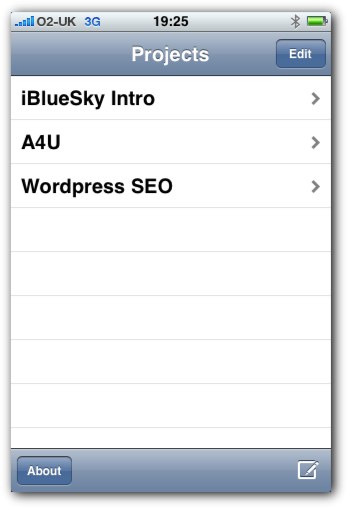
I recently did a review of MindMaker, the first Mind Mapping tool for the iPhone and iPod Touch. My review outlined a great concept but it was lacking some key features such as the ability to import and export maps and work in landscape mode.
I was very happy when i received an email from the creator of iBlueSky asking me to take a look at their app that provides competition for Mind Maker. I got the app installed and working right as I was leaving the house to attend the A4U Expo in London.
I was planning on writing the review when I got back from the A4U but I did get the chance to try it in the very first session of the A4U Expo. The first session was from Joost de Valik and was about Search Engine Optimization for WordPress.
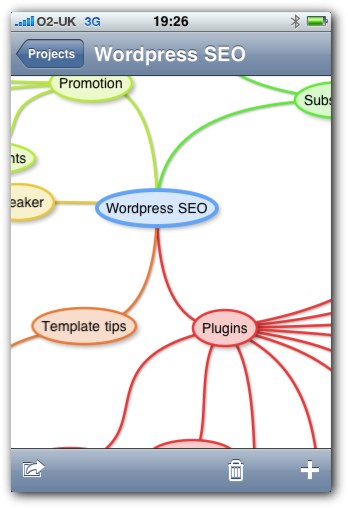
Rather than take notes for the session in my trusty Moleskine, I decided to give iBlueSky a live test and use it to take the notes in what was an excellent session.
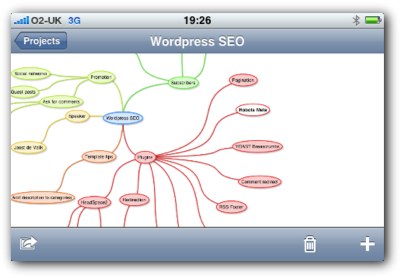
iBlueSky is very similar in operation to Mind Maker, it is after all a Mind Mapping application for the iPhone and iPod Touch. The entry was working out a treat. You are able to use landscape mode and the addition of branches is very straightforward and anybody who has used a Mind Mapping application would be able to pick ip up in no time at all.
There is a default map already installed for you to play around with. The map I created got quite big, quite fast and I found it easy to add new branches, sub branches and also to navigate around the map.
This is in my opinion the best Mind Mapping tool to date for the iPhone and iPod Touch. There were a couple of little niggles which will hopefully get sorted for the next release. These were that the addition of new branches to a busy map sometimes overlapped existing branches. This made organization a bit cumbersome.
The branches were also quite difficult to move as it required an extremely accurate drag to move the branch and not the entire map. Some way of selecting a branch in drag mode would be great. The only other niggle is that when moving a branch, the sub-branches stayed put, creating a nesting overlapping issue.
All of the issues do not distract from what is a great app. Landscape mode works great, although the screen is restricted by the bars at the top and bottom.
The killer feature that really separates this from Mind Maker is the ability to email the maps. Once the Map was created, I emailed it to myself.
The map arrives in four formats:
PNG Image
PDF Document
OPML For Importing into various mapping and flowchat apps
Freemind MM Format for use with Freemind, the Open Source Mind Mapping app
How cool is that!
Great app, and look forward to seeing more of these cool apps arise for the iPhone and iPod Touch.
Oh, and for those of you interested in the session from Joost, which was fantastic as usual. Feel free to download the map by following the links below.
Well, this is the only blog post I have managed this week but there is a good reason. For the past four weeks I have been writing a new ebook for Cisco Press entitled Securing Networks with ASAs Fundementals.
My deadline for the ebook was today, 12th October. I had a slightly delayed start to the project as I needed to free up one of my ASAs so that I could work through the configuration and make screenshots etc. So, for the past week I have been working on the ebook in every spare minute I have had. I have had around 5 hours sleep per evening and really put in the hours. Turning out 20,000 words and 82 figures for the ebook which Cisco Press will launch in a month or so.
Being so busy and so focussed has given me some ideas for some more posts, which I will hopefully get done this week as I am away for the next few days at the A4UExpo in London.
Oh, I also eventually got a 30″ monitor this week. Wow, how much better is working with so much screen real estate!
Here are my links for this week, although I have not has nowhere nearly as much browsing time as usual!
My first link for this week is has to be AwayFind from Set Consulting. AwayFind is a great new web application aimed to help you adopt an email practice where you check it twice a day but still get notified of urgent messages by other means, such as a text message to your cellphone. I have started using this and I love it as it fits in with my email productivity series perfectly. There will be more to come on this in the coming days. AwayFind is currently in private beta but be sure to check it out.
My third link is a link to a students GTD#1 – Collect. I always enjoy picking up on these lesser known blogs where real people are learning and writing about GTD. I like this purity of this one.
My fifth and last link for this week is How to Use Parkinson’s Law to your Advantage. Parkinson’s law states that work expands to fill the time available for its completion. Check out this post and see how to use this to your own advantage.
So, off to London tomorrow for three days and the A4UExpo. Should be a great conference as the line up of speakers looks amazing and it is always good to meet fellow bloggers and affiliates to share knowledge, and of course a beer or two!
Another busy week, mainly due to the fact that I had a news story published by the BBC in the UK and it got a lot of coverage. Sometimes things happen that change your planned work week and this week definitely was one of those weeks.
Here are my cool links of the week for all things GTD and Productivity related.
My first link for this week is a great post from upcoming GTD Blogger John Kendrick. The post is titled Journaling your way to GTD and is well worth the time investment.
My second link is a guest post by Leo from ZenHabits.com on the Four Hour Work Week blog. The post is titled How to Never Forget Anything Again and it is a great post that goes through some of the great tools that are available for running our busy lives.
My third link is a great post about Ubiquitous Capture from Freelance Switch. This is a great blog with some fab guest bloggers who write about a whole host of topics aimed at the freelance worker.
My fourth link is a collection of GTD Wallpapers from Smart Productivity. These are aggregated from other sites but brought together in a neat post. Gives me some ideas for my new rebrand which is coming soon..
My fifth and last link for this week is an old classic, but one that I just re-read recently. This is the getting started in GTD post from Merlin Mann at 43Folders.com. This is flagship content from Merlin Mann and a great post for anybody looking to get started with GTD.
I have a crazy week ahead as I have a book deadline for Sunday the 12th so I am going to be busy evenings this week writing away. I also have a new brand coming for this blog. All exciting stuff and I cannot wait to get it out there.
Just thought I would post these great videos from Zig Ziglar. Zig is one of my all time greats when it comes to motivational speakers. His mix of humor and great beliefs make him a pleasure to listen to an learn from.
Enjoy the videos and I would love to hear your comments on them.