OmniFocus 1.0.2 is Out

I apologise for the OmniFocus related news yet again, this blog really is becoming a blog about OmniFocus, but the guys at OmniGroup have just released OmniFocus 1.0.2.

I am downloading it as we speak, and will report on the findings.

I am going away a week today for a two week well earned vaction to the Algarve in Portugal. Looking forward to the break and I have collected a few great books to read whilst away. I will write a few posts over the next few days and try to make time to blog whilst on holiday as my trusty EeePC is going with me.

So, the release notes from OmniFocus 1.0.2 are as follows

OmniFocus 1.0.2 – May 14, 2008
This update to OmniFocus focuses on adding support for additional languages, as well as fixing some stability and interface issues and other minor bugs.

Over the last few months, most of our attention has been focused on OmniFocus 1.1, where we’ve been adding support for synchronization, and on writing OmniFocus for the iPhone. We plan to release both OmniFocus 1.1 and OmniFocus for the iPhone in late June (if they’re ready!).

Additional languages
OmniFocus is now available in Japanese, French, German, Spanish, Italian, Dutch, and Simplified Chinese. Please let us know if you see any problems with any of these translations!

Stability
OmniFocus should no longer crash when dragging images from mail while editing.
Instead of crashing, just a log an exception when pasting rich text that has odd formatting properties and use defaults instead.
Fixed a hang occasionally seen when using a two-button mouse.
Worked around a Leopard bug (5728015) which would cause OmniFocus to crash after used the Help menu to search for a menu item.
Fixed a memory leak.

Interface
Improved OmniFocus’ memory of which windows were open the last time you used it. (OmniFocus used to sometimes open windows that you’d previously closed, or forget their current position or size.)
Right- or control-clicking on an item now changes the keyboard focus to that item before bringing up the contextual menu. This ensures that all the items in that contextual menu will be validated against the appropriate target item.
The reset button on the view bar should show up when making changes while a perspective is active.
Remove contextual menu items that were not applicable to sidebar items.
Updated some labels in Data Preferences.
Fixed a bug where the “Show in Context Mode” menu item would say “Show in Project Mode” until you first switched modes in a window.
When Software Update finds an update with the same major version as the currently licensed application (e.g. OmniFocus 1.x), it should now correctly indicate that the update price is free.
The license window will no longer continue to display “No license available” after a license is added.
Fixed the help link in the Mail preference pane on 10.4.
When a chosen keyboard shortcut is already in use by a menu item, we now present the full path that leads to that menu item.

Miscellaneous
The code used in OmniFocus is now signed for Leopard’s benefit. (For more information, see Leopard’s code signing release notes.)
Focusing on a project now saves any edits that are in progress.
When synchronizing with iCal, we now set an appropriate local time to incoming dates without times. This should help solve synchronization issues for people in New Zealand who are using daylight savings time (where the local date differs from London’s date when it’s noon in London). It also means that we’ll apply the default due time setting from Data Preferences to items created in iCal.
Worked around an operating system bug which could delay automatic backups after waking a computer from sleep.
License files will no longer be created with the “execute” permission enabled. (The files were never actually executable, and shouldn’t be marked that way.)
Removed a Console log message which would sometimes appear when executing AppleScript.
The online help now correctly indicates that you hold down Option to copy a file rather than linking to it when dragging.
Added logging to the Mail Rule processing script so that it’s easier to for users to determine whether or not it’s getting called by Mail.

New OmniFocus GTD Video – Perspectives

My regular readers will know that OmniFocus is my current GTD system of choice. I am busy as hell at the moment and this is pushing my GTD and organizational skills to the limit!

One thing I love about OmniFocus is the size of it. I am always finding cool new ways to use it. Anyway, the OmniGroup have just released a new video on OmniFocus, that covers the use of Perspectives.

The video is not yet on YouTube, and only on the OmniGroup site as a Quicktime .MOV file.

The direct link to the movie is here, check it out and feel free to comment…

Merlin Mann GTD Google Tech Talk

Hi All,

I had a crazy week last week exhibiting at InfoSec with RandomStorm. It was hard work both physically and mentally.

Got some more great ideas for this blog, and writing the posts is added as a task in OmniFocus as you would expect.

Anyway, just watched this great Google Tech Talk from the great Merlin Mann of 43Folders.com. This was recorded 31st March 2008 and has found its way to YouTube. It lasts for 35 minutes and is a great watch, if like me, you are into all things GTD.

43Folders.com used to be THE place for GTD info but the posts reduced and they all seemed to be written by guest bloggers. Recently Merlin has been writing some more good posts and it is great to see him back.

Anyway, rant over, and here is the video for you all to watch.

Great Review of GTD Software Applications

Kevin Crenshaw posted a comment on my post about the Mind Meister 2.0 upgrade. In the true spirit of blogging, this made me visit his blog and check out what he was up to.

Kevin runs a company and website called Priacta, and he is in the personal productivity coaching arena, offering both onsite and remote coaching.

The reason I am mentioning all of this here, is that on the Priacta website, Kevin has taken the time to pull together a great, and very comprehensive review of all of the major Getting Things Done (GTD) Applications.

There were 99 reviews when I started this blog post and I have now just checked and found 100 reviews.

The reviews are very good and cover Windows, Mac, and Linux Operating Systems as well as mobile and web based applications.

Anyway, check out the reviews and I hopefully you will find some value in the reviews.

MindMeister Upgrades to Version 2.0

MindMeister 2.0

You will all know that I love Mind Mapping, and I also love MindMeister, the online Mind Mapping Collaboration tool.

Well, the guys at MindMeister have just updated their software to version 2.0 and included a few cool features.

What’s New in MindMeister?

Our users often tell us that they like MindMeister because of its intuitive interface and overall simplicity. That’s why we try to add only the most necessary features in new releases – and still, this time it turned out to be quite a long list 😉

Oh, and don’t fret if you can’t find your pet feature below, in spite of all the talk about simplicity some more updates are coming soon!

Task information on ideas
As a first step to lightweight project management in MindMeister you can now add task information – priority, completion, due date and owner – to ideas. More to come!

Attachments on ideas
You can now upload file attachments to ideas and preview images through inline thumbnails. This feature is for Premium users only, but everybody can try it out for 30 days.

WunderLink and WunderNote
Try out these new functions to magically add links and notes to your ideas, using the wonders of the web. WunderLink gets its link from a little Yahoo! search performed in the background, while WunderNote uses a FreeBase database lookup.

Automatic text wraps
Idea captions will now automatically wrap at a certain length to avoid overlong nodes (you can keep the old behaviour by adding manual line breaks with Shift-RETURN)

More Geistesblitz features
In our constant quest to improve the Geistesblitz tools we have now added email support and a Geistesblitz Activity for Internet Explorer 8. With email support, you can send single Geistesblitzes or while mind maps just through an email.

Subsharing for maps
New option to allow collaborators to invite others when sharing a map – this will also work for already shared maps

Print and export enhancements
New option to center map on printout, PDF export of mind map now includes notes

Formatting and navigation enhancements
Apply text styles selectively to child ideas, nicer formatting of first level branches, ability to expand and collapse levels

More note and link enhancements
Advanced and larger note editor with more formatting options, new links widget in sidebar, “Show popular links” for idea

OpenID and Paypal support
Support for signup and login through OpenIDs and Paypal support when upgrading to commercial licenses.

Other enhancements
Nicer invitation and sharing emails, new user options, improved support for Safari and Opera, performance improvements through better script and image loading.

This is a huge upgrade with some rather cool features. Be sure to check out MindMeister as best of all, the basic version is free and easy to use.

Upgraded to WordPress 2.5

After waiting a couple of weeks to see if there are any issues, I have today upgraded to WordPress 2.5. I must admit that I am liking the new interface and I am going to spend some time looking into the new features and functionality offered by version 2.5.

Hopefully, I will not inherit any problems so please let me know if you find any.

Also, thanks to all who added me on Facebook and Twitter. Got quite a few of you now on both applications and I am looking forward to interacting with you all in the future.

Social Networking with Twitter and Facebook for Getting Things Done

Well, I have been using Facebook for around a year and I have had my Twitter account about the same. I got into Facebook after receiving many requests to join from other friends and colleagues. I find the groups great and there is even a global GTD Group that I am a member of.

So, for all you other Facebooker’s, feel free to add me as a contact on Facebook.

Now, Twitter is the next thing I want to talk about. I used Twitter when it first came out and didn’t really get it. I read other blogs such as Shoemoney and John Chow and I see that they are all getting back into Twitter so I thought I would try it again. I followed the advice of Robert Scoble and went out to follow quite a few people who I have heard of, and also people who they follow. The results are great. I am now presented with a great social network and I find it an amazing way of keeping up to speed with what is going on in the world.

So, Try this out for yourself and be sure to Follow Me on Twitter.

Full Text GTD Feeds

Well, I have eventually swapped my blog over to using Full Text Feeds rather than a Summary Feed. I have had a few people ask for this and feel it is the better way to go.

I have also got a cool RSS to Audio reader that is hopefully turning my blog into a PodCast that I am playing with. Seems to work pretty good and I am looking forward to getting it all working.

Getting Things Done in Las Vegas with OmniFocus

Well, I just returned from Affiliate Summit West ’08 in Las Vegas. Vegas is a 10 hour flight from the UK and we had a 5 hour drive to the airport so you could say that it was a long trip so my expectations were high, but is is Vegas after all.

Anyway, had a great time at the conference. Was a pleasure to meet people such as John Chow, Zac Johnson, and Justine Ezarik. I was gone from home for 5 nights and even though I was away, my tasks and work were not.

My current GTD system of choice is centered around OmniFocus from OmniGroup. I use Moleskine’s as my task capture device, and wherever you find me, the Moleskine is not far behind. This works for me as I can collect and hold numerous tasks on my Moleskine, and then enter them into my OmniFocus application when processing, and time permits.

MacBook Pro and EeePCI own a 17″ MacBook pro, and even though I love it. I really wanted something more portable to take to Vegas with me and the Asus EeePC had really taken my eye. All I need is web, email, and Skype to call back home at 1p a minute rather than the exorbitant rate of 55p per minute with my cell phone. The EeePC ticked all the right boxes so I bought one a couple of weeks ago and it is a fantastic little computer. It isn’t a Mac, so cannot run OmniFocus and I did not want to start looking at Linux based GTD apps, if there are any!
My mobile phone of choice is the Apple iPhone, and as the SDK for the iPhone apps is not yet out, I needed a way to leave my current system at home and still be able to record my tasks.

Sure, I could collect everything into my Moleskine’s but I do like to feel more organised than that and I was looking for some way to integrate with my OmniFocus whilst away.

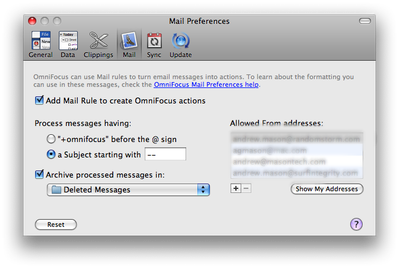
I had seen an option in the OmniFocus Preferences about emailing actions to OmniFocus so I thought I would read up on the feature and how it can be used.

OmniFocus GTD

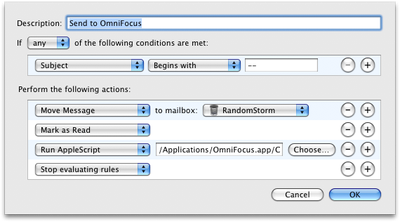
This is implemented as a Mailbox Rule within Mail.app on the Mac as you can see from looking at the rule below.

OmniFocus GTD

I set the OmniFocus application to Create the Mail Rule, archive processed messages and also to process messages where the subject line starts with “–“. Cool, now let’s see a real world example of how I use this every day in my GTD system.

I configured and tested this before I set off to Vegas on my trip. So, from my iPhone I can now email myself, on one of the registered email addresses and all I have to do is start the subject line with “–“, which is something I never see at the start of a subject line and therefore unique. Now, I always carry my Moleskine, but when sat in a conference, or anywhere else where you have WiFi or EDGE connectivity I can quickly send myself this email and it adds it straight to my inbox on OmniFocus as soon as I get back to the UK and power on my Mac.

In the week I was in Vegas I sent myself around 100 tasks. I find this method a great way as I did not have to update OmniFocus with my notes from my Moleskine like I normally do. They were copied directly into the inbox waiting to be processed into the correct context and have dates assigned to them.

Now, I just use this system in its simplest form in that I just get the task added to OmniFocus. As well as this, you have the ability to add various tags to the email to automatically move it to the correct context and set various other items such as the due date etc..

These are as follows:

The first line, and any other lines starting with — (double-hyphens), become new actions. Other lines become notes for the preceding action.

To specify a project, use > (greater-than sign) or :: (double-colons), followed by a project name or abbreviation.

To specify a context, use @ (at sign), followed by a context name or abbreviation.

To enter start or due dates, use # (number sign), followed by some date expression.

To enter a time estimate, use $ (dollar sign—time is money) followed by some duration expression (like 5m, 1h, and so on);

You can also add a note on the same line as an action title by separating them with // (double-slashes). Anything after the double-slashes becomes a note, but double-slashes in a URL like http://omnigroup.com don’t count.

Some examples are as follows:

— Call My Boss

— Paint the Garage Door > Household @ DIY

— Action 3 > Project 1 @ Context 1 // These are notes

— Action 4 #friday // Due Friday, because I only entered one date

— Action 5 #monday #friday // Starts Monday; due Friday.

— Action 6 #monday # // Starts Monday; no due date.

— Action 7 :: Project 3 // Written on my iPhone; colons work in place of greater-than sign.

–Action8>p2@c2#2d$5m//no spaces needed, nor full names

Myself, I would rather just get the task collected and process it later on my Mac using OmniFocus and my full size keyboard.

This is a great way to use the iPhone as part of your GTD solution. That is until OmniGroup release a native iPhone version of OmniFocus after the Apple iPhone SDK release.

Hope you have enjoyed this post and as always, I would love to hear your comments.