GTDAgenda – Review of the GTDAgenda GTD and Productivity Application

This is the second in my review series of GTD Apps. This time we are reviewing GTDAgenda.

GTDAgenda is a Web Based application based around the GTD philosophy. One downfall is the fact that you need an Internet connection in order to use this system so you cannot easily take it with you.
GTD Agenda
GTDAgenda.com is a website designed to assist individuals in increasing their productivity through David Allen’s Getting Things Done model. It does an admirable job of shaping the foundation of his advice into a practical, easy-to-use system that could easily change people’s lives through regular use.

The site’s aesthetic are plain but well conceived and goes a great length toward marrying functionality with a myriad of useful features. Perhaps the most impressive aspect of the design is found after playing around with categorization tools and discovering exactly how deep the system actually is.

Seemingly nothing has been overlooked by the GTDAgenda team but the entire page never comes off as overly complicated or confusing. GTDAgenda instead chooses to let users dive into the various functions at whichever level they desire. It’s perfectly possible to use the page as nothing more than an electronic calendar, checklist or broad planning tool but for those who look deeper there is also a ton of great details to take advantage of as well.
GTD Agenda
The layout of GTDAgenda is in itself worth taking the time to discuss. The simple design and ease of use mix together very well. Although the page is relatively plain looking, there is nothing so offensive as to keep users from wanting to use GTDAgenda as a frequently viewed hub for their planning activities. Much like the Word document ‘to-do’ lists which Allen displays in Getting Things Done, GTDAgenda allows for an immediate response from users simply through its simple, upfront look.

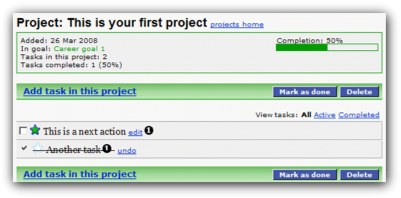
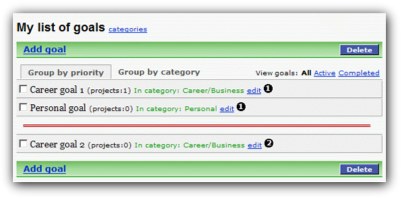
All of the features are designed with Allen’s GTD model firmly in mind and go a long way toward allowing the site’s users to fully embrace the productivity system. GTDAgenda hosts a header which lists key organizational points (such as Goals, Projects, Tasks and Next Actions) along with appropriate sorting options within each one of these categories. For example, clicking on ‘Tasks’ displays a sub-category wherein users may prioritize their work to fit different criteria.
GTD Agenda
Each header keeps a few features the same so they may be referenced no matter what you’re concentrating on at the time. A handy calendar hangs on the right-hand side of the page and opens scheduled tasks and action steps by clicking on a given date.

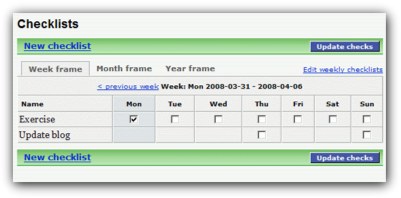
The context menu is also an excellent implementation of core GTD philosophy as it allows users to sort their various work into categories such as @Computer, @Home and Errands. A checklist feature goes even further toward allowing for the kind of satisfaction Allen recommends from crossing off completed work and visualizing what must still be done so it can be taken off one’s mind.

GTDAgenda is difficult to criticize as it does perform a fantastic job of offering a productivity system styled upon the core principles and tools purported by the book. Nothing at all presents itself as ineffective or worth taking the time to negatively address in a review. The bottom line perhaps is that, like every organization tool, GTDAgenda will work for some and not for others.

Anyone even remotely interested in the GTD productivity model should at least check out GTDAgenda. The site and application does a great job of providing a system that allows for as little or as much customization and organization as any user could hope for.

Please note, the links to GTDAgenda are affiliate links so anybody signing up will result in myself getting paid a referral feed. This has not tarnished or influenced my review of GTDAgenda.

Email Productivity Experiment – Update 3

This is the fourth post in my mini series about email productivity. For those of you who missed the first three I have provided links to them below.

Email Productivity Experiment
Email Productivity Experiment – Update 1
Email Productivity Experiment – Update 2

After the last installment of this series, I had changed my email collection timer from the default 5 minutes to one hour. I had seen quite an increase in productivity as I was working on emails in batch rather than what seemed to be every five minutes.

I decided that the next step was to check my email four times during the working day. These times were to be at 0900, 1200, 1500, and 1700.

There is no automated way to do this within Mail.app, the default mail client on the Mac and the one that I use so I had to turn off the automatic mail collection setting and set this to manual. So, from now, I received email when I manually clicked on the Get Mail button within Mail.app.

For the first few days this was going great. I informed the people directly involved with me that I was only checking email at these times and if something was urgent, then they needed to tell me in another way.

It generally worked out very well. Just like with the one hour gaps, the time between email on a three hour gap soon came around and I was amazed at how fast time was going in between email. It was nice and actually felt quite liberating to be free of the feeling that you have to check email.

All this was very well and good until I stumbled across a little item that resulted in me working very closely with the BBC and other journalists for just over a week on what became quite a well covered news story, even making the front page of Digg!

Because of this, I found most of my good work go straight out of the window as I had to check my mail frequently as I had to answer time sensitive questions. So, I found myself checking mail very frequently to ensure that I had not missed anything from any of the people I was working on the story with.

This has identified to me that strict email systems like these have to give sometimes, unless that is I can find a way around this. Some way of being able to filter the mail before I get it to my mailbox so that if I am working on something like this in the future I will be able to selectively receive mail. I could use a second address but that is not really an elegant solution so off I go looking for a way to achieve this.

Just out of interest, the story I did was posted here on the BBC website and was covered on many other technology and security news sites. The hits to our company website at RandomStorm sure did increase as you can imagine!

The report went live on Monday and it has been a very busy week. I am back to checking email once an hour and aim to go back to the four times in a working day from next Monday.

This has been a great lesson to me about flexibility in systems and the fact that sometimes the system has to give. It was in my interests for it to give as it was a priority for me to ensure I gave a speedy response to questions asked.

I am looking forward now to improving this.

GTD and Productivity Links – 28th September 2008

Last week has been a very productive week. Not managed to do another email post but I have to do one pretty soon as some unexpected projects have turned my email testing upside down and I think I have realized some shortcomings of fixed systems that I would love to work around.

It just so happens that I also have a beta invite to an email solution that may fit the bill perfectly for me.

Anyway, more about that later so let’s get onto this weeks links.

Calling it a day now. It was my son’s birthday today and we have had a rather busy day.

Thanks, and good night all..

MindMaker – Mind Mapping for the iPhone and iPod Touch Review

If you haven’t already subscribed to this blog, now is a great time to do so, especially if you want to be more productive in 2009! Follow this link to subscribe in your favorite RSS reader.

MindMaker
Being an avid Mind Mapper, I was excited to see the release of MindMaker, the first Mind Mapping application on the iTunes store for the iPhone and iPod Touch.

I have been using the app for a couple of days and thought I would post a little review of my findings of the app. I am quite experienced in using Mind Mapping applications having used them for around 8 years. My current favorite is Mind Manager from MindJet which works like a dream on my Mac. Mind Mapping works for me and has helped me pass many exams and helps me plan important events.

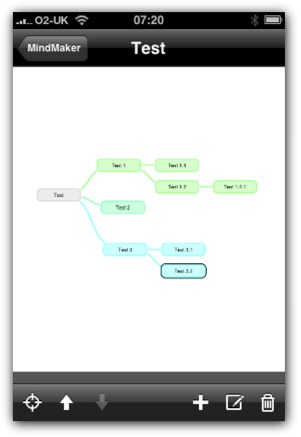
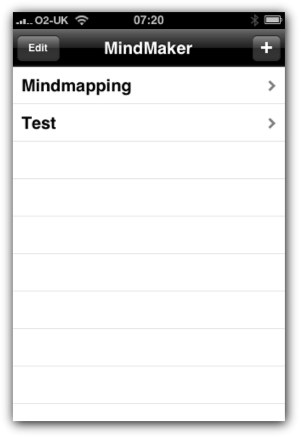
MindMaker initially presents you with a list of Mind Maps that you have created on the device. When you first install it there is a demo map that helpfully shows you some of the features of MindMaker.

MindMaker

Clicking on an existing Map name will take you straight to that Map in the map view mode. Clicking on the + icon at the top right of the screen starts a new Mind Map with a blank center map piece.

Once you get to a Mind Map the navigation is very simple and exactly what you would expect if you have experience of other Mind Map applications. Adding branches to your map is very intuitive making large maps very easy to produce. The ability to drag branches is nice and the animation of the branches moving is very slick and smooth.

So, what are my thoughts about the app. Well, it is a great concept but I have questions as to how much I would use such an app on my iPhone. I personally use Mind Maps for project planning as well as to brainstorm an idea or technology. I then use them as memory joggers when I need to refresh my knowledge on a subject. The killer for me is to be able to view Mind Maps on my iPhone rather than create them. I am more than happy to create the Mind Map on my Mac and then save it as a PDF and view it on my iPhone using the AirSharing app or similar. This works for me.

MindMaker

Note taking on my iPhone and idea collection is covered off pretty much with OmniFocus and Evernote. I cannot see myself using MindMaker to replace either of these functions.

Version 1.0 is lacking some very important features such as the ability to view the map in landscape mode and the ability to export and import maps. Luckily, the developers of the application seem to have covered these shortfalls in their roadmap.

The current version is 1.0. The developer has announced some features that are coming in later versions.

Version 1.1

  • Mind maps can be saved as images
  • Support for Landscape mode
  • Translucent hideable interface

Version 1.2

  • MindMaker will be able to upload mind maps to a web application from which users can download it in different formats.

Future features

  • Cross links between nodes
  • Reordering of nodes
  • Editable colors
  • Export to different formats

In summary, MindMaker is a great little iPhone app but I do feel that it is an app that has limited usability due to the input constraints of the iPhone.

I will update my iPhone with the latest versions as they come out and I will ensure that I follow this review up when the updates come out.

GTD and Productivity Links – 21st September 2008

Time seems to have accelerated over the past week. It is a strange phenomenon that when you have a very busy week time seems to accelerate.

I have been out or away from home 5 out of the last 7 nights on work related trips and meetings. It is now Sunday night and I am eventually getting/making some time to write my thoughts down on my blog and letting you all know of what cool productivity and GTD links I have unearthed in the past week.

Well, without further undue, here are the links for Sunday the 21st September 2008.

Well, time to catch up on a few blogs and then off to bed, another busy week and I have a big project to start this week along with some learning I have to do for another looming project.

Hopefully back tomorrow with some more insights into my thoughts..

Thanks, and good night all..

StumbleUpon – The Second Northern Bloggers Meetup

Well, I have just arrived home from the second Northern UK Bloggers Meetup. After the success of the first meetup, I could not wait to see what else I could learn from the second, and also what people I would meet.

As before, the event was organised by Jamie Harrop and the main speaker for the evening was Tim Nash, who presented a fascinating talk about StumbleUpon. Now, I have not really used StumbleUpon, apart from playing with a paid campaign for one of my other sites at the beginning of this year and it was great to hear Tim, who obviously knows one heck of a lot about StumbleUpon, share a few of his secrets with us. I have already signed up for StumbleUpon and added the toolbar to my installation of Firefox, so let’s see if I can put his great advice to use.

Follow this link to get to Tim’s post that contains his presentation slides and also some more great tips about StumbleUpon

Apart from the usual faces from the last event, there was a couple of new faces in the meetup. One of these was Mike Little from Zed1.com. Mike was one of the founding developers of WordPress and I found out when I got home that I have a book in my bookcase that he wrote about Drupal, phpBB, and WordPress.

I also met and chatted with Al Carlton from Self Made Minds, as well as other blogs. Al seemed like a very knowledgeable and well connected chat that I hope to network with further at future events.

Karyn from Miss Thrifty was also a newcomer to this event. Great to see some women at what is usually a male dominated event.

Well, cannot wait till the next one and I am going now to play with StumbleUpon and also watch some Ryder Cup!

One last thing, Stumbles on this post are most appreciated 😉

David Allen Getting Things Done GTD Seminars

Just received an email with some updated dates for two of David Allen’s seminars. These are the GTD: Mastering Workflow Seminar and GTD: The Roadmap Seminar.

Here is the intro to the GTD: Mastering Workflow Seminar

This one-day seminar delivers a dynamic, systematic, five-phase approach to dealing effectively with the incoming “stuff” of our lives – mail, memos, meetings, email, ideas, notes, to-dos, projects, reference materials, etc., and provides a practical methodology for utilizing paper-based and computer-based systems to organize it.

Here is the intro to the GTD: The Roadmap Seminar

The flagship of the GTD (Getting Things Done) seminar series, The RoadMap defines the game and helps you jump into it at a new and expanded level. This lively one-day workshop features David Allen live and in-person as he examines the core principles of productivity improvement, then provides you with a unique opportunity to develop your own specific and immediate action steps to implement them.

They both sound fantastic events that I would love to attend.

The dates for GTD: Mastering Workflow are:

  • Sept 30 – New York City, NY
  • Oct 3 – San Francisco, CA
  • Oct 10 – Washington, DC
  • Oct 23 – London, UK
  • Oct 31 – Seattle, WA
  • Nov 7 – Tampa, FL
  • Nov 11 – Toronto, Canada
  • Nov 20 – Boston, MA
  • Dec 3 – Pittsburgh, PA

The dates for GTD: The Roadmap are:

  • Sept 19 – Boston, MA
  • Oct 24 – London, UK
  • Nov 4 – Atlanta, GA
  • Feb 17 – Dortmund, Germany
  • Feb 19 – Amsterdam

I would love to attend one of these seminars but I am too busy on both of the days when these are being held in the UK. I would love to hear from anybody who has been on similar seminars or how plans to attend these seminars.

GTDInbox – Review of the GTDInbox GTD and Productivity Application

I am starting a process where I review all of the available GTD and Productivity applications available and then make them available via this blog and a simple applications page that lists the applications as well as links to their reviews.

GTDInbox

To kick this process off, I have provided a review of GTDInbox. I met with Andy Mitchell, the creator of GTDInbox at the recent Northern UK Bloggers Meetup so I thought it would be great to start with a review of hid GTD Application.

GTDInbox is one of the best (and most popular) applications designed to help advocates of David Allen’s Getting Things Done productivity model implement the system into their day-to-day life. Designed by Andy Mitchell and continuously supported by a community of users, GTDInbox is an ongoing project (started in 2006) that seeks to add greater functionality to the pre-existing and widely used, Gmail.

GTDInbox

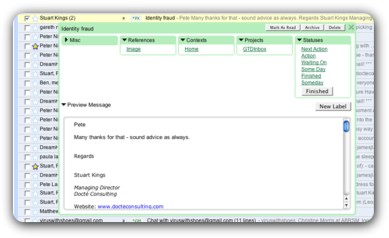
The program works as an add-on for the Mozilla Firefox web-browser and easily transforms Google’s Gmail into a less cluttered, productivity-friendly email system. In terms of the software itself, GTDInbox does as an admirable job of both adhering to the principles of the GTD model while still providing an inbox that you’ll actually want to use. Important organizational facets of Getting Things Done have been made a keystone design element so that users are able to sort their mail and tasks with a level of depth not present in any existing email inbox. Even for those who only want the cleanest, easily navigated email service, GTDInbox is a good bet. It provides an intuitive interface and focal emphasis on sorting so that users are able to keep their inbox under control rather than thrown into haphazard folders and lists.

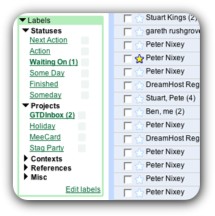
One of the most interesting features of the add-on is the ability to use your email inbox for more than just sending, receiving and archiving mail. GTDInbox adds a personal database to Gmail so that daily planning, next-action steps and to-do lists can all be accessed easily. Considering that almost everyone uses their email inbox as their daily hub anyway, the extra functionality is one of the stand-out features of the program. Email can be transformed into tasks, which constitute a central concept of David Allen’s model (wherein the author advocates this very process but could only advise a roundabout process which didn’t yet exist) and makes for a fantastic, stress-free inbox. Each email/task can be assigned a priority in the same fashion as the personal database and these are all modeled after the general ‘inbox’ described in Getting Things Done (such as sorting by ‘Projects’ or ‘Next Action’, ‘Action’, ‘Someday’ or ‘Finished’ statuses).

GTDInbox

It’s difficult to identify any glaring flaws with GTDInbox and it’s at least worth a try for anyone who either wants to start implementing Allen’s model into their work-life or just take advantage of a great, email client add-on. Users should know that the initial add-on is free of charge but that accessing GTDInbox Pro requires a donation (from as low as $15 USD) through PayPal. The Pro version only adds minor features such as early release beta downloads, multi-computer (preference setting) synchronization and special recognition on the user forum so this is hardly a drawback and more of a way to show support for Andy Mitchell and GTDInbox as a program.

Obviously GTDInbox only functions as one part of the Getting Things Done whole but considering the wide array of practicality set out in Allen’s book, Andy Mitchell and team have done a fantastic job of giving consumers an entry point into the system. In terms of achieving the fundamental GTD philosophy of organization and pro-action toward increasing productivity, GTDInbox succeeds marvelously and is well worth the download.

I hope you have all enjoyed this review and look forward to hearing your comments and feelings about GTDInbox.

For those of you who missed the inline link, GTDInbox can be obtained by following this link.

This is the first review of many, and soon I will be accepting request to have products or services reviewed so we can build up a great list.

Thanks, Andrew..

GTD and Productivity Links – 14th September 2008

Well, I completed my 10K run today for cancer research with my wife, Helen. It is the furthest I have ever ran and we did it in 1:07. I was hoping for a time under and hour but we were really held up over the first 3000 meters due to hilly sections and a very narrow path. There were 1200 people running and the hill was a bit of a bottleneck that we got stuck in.

I have loved having this as a goal and it felt great to do it. I will start to look for another physical challenge now.

So, here are some links for this week.

Well, I am shot, and about to go to bed.

Speak to you all next week.